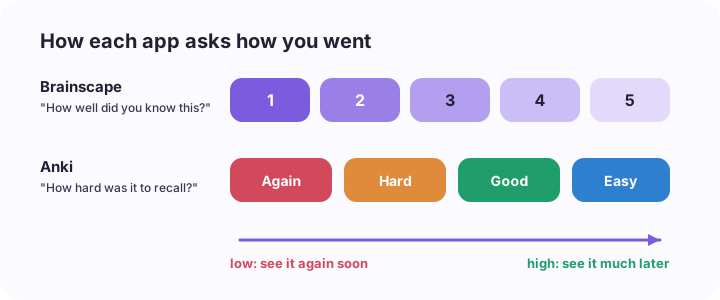
Flip a card in Brainscape and it asks you one thing: on a scale of 1 to 5, how well did you know that? Flip a card in Anki and you get four buttons: Again, Hard, Good, Easy. That small difference in the question tells you most of what you need to know about the two apps.
If you want the strongest scheduler and you don't mind an evening of setup, use Anki. It's free on desktop, the web and Android, and it's still the tool med students swear by. If you want something that looks friendly, works the same on your phone and laptop, and lets you start in five minutes, use Brainscape, and know that the best parts (unlimited AI cards and its expert-made decks) are paid. Both expect you to make or find the cards yourself, which is where most people actually get stuck.
Side by side
| Brainscape | Anki | |
|---|---|---|
| Price | Free plan; Pro around US$96 a year, or around US$20 a month billed monthly in the app | Free on desktop, web and Android; iPhone app US$24.99 once |
| How you rate a card | Confidence, 1 to 5 | Again, Hard, Good, Easy |
| Scheduling | Simple and predictable | The most advanced there is, and tunable |
| Learning curve | Minutes | An evening, sometimes a week |
| Ready-made decks | Big user library, plus expert-made decks on Pro | Huge community decks, especially for medicine |
| AI card making | Limited on free, unlimited on Pro | None built in (add-ons and outside tools) |
| Card types | Text, with images and sound on Pro | Everything, including cloze deletions and image occlusion |
The rating question matters more than it looks
Both apps use spaced repetition: cards you struggle with come back soon, cards you know drift further away. If that idea is new, this post on spacing explains it.
The difference is what you're asked to judge. Brainscape asks for a feeling of confidence. Anki asks about what just happened: did you get it, and how much effort did it take?
That sounds like hair-splitting, but it isn't. Learning research has shown for a long time that students are often overconfident about material that feels familiar. Reading a card about the mechanism of ACE inhibitors and thinking "yeah, I know this" is not the same as having said the answer before you flipped it. A 1 to 5 confidence scale makes it easy to give yourself a 4 because the answer looked right once you saw it.
Anki isn't immune to this. You can still click Good when you half knew it. But "Again" is a blunt, honest button: you forgot, so it comes back. In my experience it's harder to fool yourself with a button that says you failed than with a dial that says you were fairly sure.
The fix in either app is the same. Say or write the answer before you flip. Then rate what you produced, not how the answer made you feel.
Where Anki wins
The scheduler. Anki tracks every card's history and stretches the gaps based on how you've actually performed. Recent versions offer FSRS, a scheduler that predicts when you're likely to forget each card from your own review history, and you can tune how much retention you're aiming for. Nothing else in this comparison is as good at keeping a huge deck alive over years.
Price. It's free almost everywhere. The one exception is the official iPhone app, a one-off US$24.99 that funds the project. No subscription, ever.
Medicine. If you're in medicine or a heavy science degree, there are enormous community decks built around common exams and textbooks. Cloze deletions ("The ___ nerve supplies the diaphragm") and image occlusion (hide a label on an anatomy diagram) are both built in and ideal for that kind of material.
Your decks are yours. Local files, an open format, and nobody can move a feature behind a paywall next semester.
Where Brainscape wins
Getting started. You sign up, make a deck, and study. There are no note types, deck options or ease factors to understand first. For a lot of students, that is the whole decision.
It's pleasant to use. The web and phone apps look and work the same, sync without fuss, and show your progress through a deck clearly. Anki works, but nobody has ever opened it for the design.
Organised content. Brainscape has a large library of decks sorted by subject, and a set of expert-made decks for things like languages, nursing and professional exams. Most of those expert decks are part of Pro, so check what's included before you rely on one.
Some AI help. You can generate cards with AI on the free plan, up to a limit. Pro removes the limit. Anki has nothing like this built in.
Where both fall short
Neither app knows what your lecturer actually said. A shared deck for "pharmacology" or "contract law" was made for someone else's course, with someone else's emphasis. Your exam is written from your slides.
So the real cost of either app is building the deck. By hand, that's roughly an hour per lecture if you're careful. That hour is why so many people quit Anki in week two, and why this post on AI alternatives to Anki exists.
Neither app explains anything either. If you keep failing the card on the renin angiotensin system, Anki will show it to you more often. It won't tell you why you keep getting it wrong.
This is the gap I built The Study Mill for (so yes, I'm biased). You upload the week's slides, PDF, notes or lecture recording, and it makes flashcards linked back to a short lesson on each idea, a quiz with written answers that get marked, and Walk & Learn, an audio session where Milli and Luke teach the week and ask you questions you answer out loud. Questions you miss come back in a daily review. It's free for 2 classes; Pro is A$7.99 a month and adds unlimited classes, exam mode and cram sheets, with half price for students with a .edu or .edu.au email.
It is not a replacement for Anki if you're maintaining a 20,000 card deck across a medical degree. Anki is still better at that one job. Plenty of students use an AI tool to draft cards from each lecture and keep Anki for the long haul.
Which should you use?
- Medicine, dentistry or a language, years of material: Anki. Put in the setup evening once.
- You've tried Anki and bounced off it: Brainscape is the gentler way into spaced repetition. Be strict with your 1 to 5 ratings.
- A professional exam with an expert deck on Brainscape: that deck may be worth Pro for a few months.
- Your exams are written from your own lecturer's slides: build the cards from those slides, whichever app you use, rather than borrowing someone else's deck.
If you're also weighing up Quizlet, I compared it with Anki in Quizlet vs Anki.
Try it on one lecture
Before you spend an evening making cards, upload this week's lecture to The Study Mill and see the flashcards and quiz it builds in about a minute. Keep them, or use them as a first draft for Anki or Brainscape.
Other apps' prices and features are as published in October 2026 and change often. Check their own pricing pages.