
Your physiology lecturer spends ten minutes on the baroreceptor reflex. The slide is six bullet points. You copy them, reread them the night before, and in the exam you can recall "baroreceptors" and "medulla" but not which way anything goes. Then someone in your tutorial draws it as a loop on the whiteboard, with arrows going up and down, and it sticks for the rest of the semester.
That's dual coding. It means learning an idea in two forms, words and a simple visual, and connecting them so each one points to the other. A diagram, a timeline, a flowchart or a quick sketch next to your written explanation gives your memory two routes back to the same idea. If one route fails in the exam, the other often still works. It isn't about being a "visual learner". It helps almost everyone, for almost any subject with structure in it.
Where the idea comes from
Dual coding theory comes from the Canadian psychologist Allan Paivio, who developed it from the late 1960s onwards. His proposal was that the mind handles verbal information and imagery through two separate but connected systems. Concrete words like "apple" are easy to remember partly because they arrive with an image attached. Abstract words like "justice" usually don't, and they're harder to recall.
A related and well replicated finding is the picture superiority effect: people tend to remember pictures better than the same items presented as words. Later, Richard Mayer's research on multimedia learning found a similar pattern for explanations. Across many experiments, people who learned from words plus well chosen graphics generally understood and transferred the material better than people who learned from words alone, especially when the content involved processes, parts and how they relate.
That last point matters. The benefit is strongest when the picture shows structure: what causes what, what's inside what, what happens in what order. A decorative clip art heart on a cardiology slide does nothing. A sketch of where the blood goes does a lot.
It isn't learning styles
Dual coding often gets confused with the idea that some people are visual learners and others are auditory or kinaesthetic learners, so they should study in "their" style. That's a different claim, and it hasn't held up. A widely cited 2008 review by Harold Pashler and colleagues looked for the kind of evidence that would support matching teaching to learning styles and found almost none.
Dual coding says something simpler. Combining words and visuals helps most learners, whatever style they think they have. If you've always called yourself a "words person", you're exactly who should try drawing more.
How to dual code your own notes
You don't need to be good at drawing. Stick figures, boxes and arrows are enough, and a messy diagram you made yourself usually beats a beautiful one you copied.
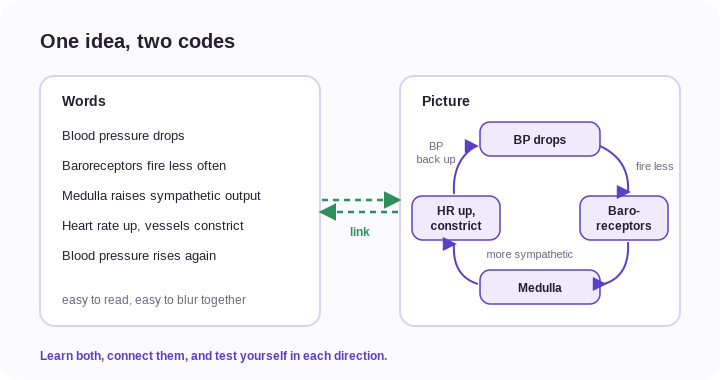
1. Pick the right kind of visual for the content. A process becomes a flowchart or a loop. A sequence becomes a timeline. A comparison becomes a table. Parts of a structure become a labelled sketch. A hierarchy becomes a tree. If you can't think of a shape, ask "what happens first, and what does it cause?"
2. Draw it from your understanding, not from the slide. Copying the lecturer's diagram line by line is close to passive. Closing the slides and redrawing it from memory is much more useful, because it's also retrieval practice.
3. Put the words next to the picture and link them. Labels on the arrows. One sentence under each box. The point of dual coding is the connection between the two forms, so explain the picture in words and point to the picture when you write.
4. Explain the visual out loud. Talk through your diagram as if teaching it: "pressure drops, baroreceptors fire less, the medulla increases sympathetic output, heart rate goes up". If you get stuck at an arrow, that's the gap to fix.
5. Test yourself both ways. Look at the diagram and write the explanation. Then read the explanation and redraw the diagram. Each direction checks a different half of the link.
What it looks like in different subjects
- Nursing and medicine: feedback loops for physiology, a sketch of the nephron for diuretics (each drug class labelled where it acts), a timeline for a drug's onset and peak.
- Psychology: a flowchart for choosing a statistical test, or a box diagram of a study design showing groups, the manipulation and the measure.
- Law: a flowchart of the elements of negligence, with a case name beside each step.
- Economics: the diagrams are already the subject. Draw them, then write one sentence on what moved and why.
I've gone into a few of these in more depth in how to study physiology, which leans heavily on loops.
Mistakes that waste it
Decoration instead of structure. Colour coding and doodles in the margin feel like dual coding but usually aren't. If the picture doesn't show how the ideas relate, it's not doing the job.
Too many visuals at once. Mayer's research also found that extra, irrelevant material tends to hurt learning. One clear diagram per concept is plenty. A page crammed with icons splits your attention.
Making the picture and never using it again. A diagram is only useful if you retrieve it. Redraw it from memory a few days later, the same way you'd come back to a blurt page.
Saying the same words twice. Reading text on a slide while someone reads the same text aloud isn't dual coding. That's one code, delivered twice.
Flashcards are a good place to start
The easiest habit to build is putting pictures on some of your flashcards. A card asking "where do loop diuretics act?" with a small nephron sketch on the back is doing two jobs at once. Not every card needs one. Save them for cards about structure, location or process, and keep the rest short, following the rules in how to make good flashcards.
I build The Study Mill, so I'm biased here. When you upload a week's slides, notes or lecture recording, it writes Learn cards that explain each concept with an analogy, plus flashcards from your own material. Where a picture helps, some of those flashcards come illustrated, and each card links back to the lesson it came from. Walk & Learn is audio only, so it won't draw anything for you, but the analogies Milli and Luke use are there to give you a mental picture to hang the words on. The free plan covers 2 classes. A pen and the back of an envelope also work.
Try it on one lecture
Pick one lecture from this week with a process in it. Close the slides. Draw that process as boxes and arrows, then write two sentences underneath explaining it. Tomorrow, redraw it from memory and see which arrows you lost.
If you'd like the flashcards made for you, upload that same lecture to The Study Mill and see which ones come with pictures.